Ran across this issue three different times; a user installs Adobe Reader update and Google Chrome gets installed. The user then uninstalls Chrome and when they try to access hyperlinks from any program, it fails. They would receive the error "This operation has been cancelled due to restrictions in effect on this computer. Please contact your system administrator." Going in and changing default browser settings did not fix the problem. It requires registry changes to fix the default browser.
Restore registry settings in the User Profile: [more]
Repeat steps 1-6 for .htm .shtml .xhtm and .xhtml k
I have read that you can change the default browser prior to uninstalling and this will not be a problem. However I have not tested this.
e recently had a client who was receiving the following error message in Microsoft Outlook: "Your automatic reply settings cannot be deployed because the server is currently unavailable. Try again later."
The reason this error message is displaying is because Outlook can’t see your Client Access Server. [more]
To get Out-of-Office to work you need to add a bypass to your proxy server for your CAS. To do this you need the name of your CAS (typically the exchange server).
Open up your Internet Options settings in Control Panel and click on the “Connections” tab. Make sure that the “Bypass proxy server for local addresses” is ticked then click on “Advanced”.
In the “Exceptions” panel type in your CAS server name followed by .* then press OK->OK -> OK to close all of the windows.
Close and reopen Outlook and out of Office settings options should now work.
Simple erasure of a disk (or thumb drive). Windows 7 “full” format will overwrite each byte on the disk with zeroes. This began with the Vista o/s and is true also with Windows 7. This can cause problems for virtual machines running on a SAN. Here is the statement from Microsoft KB 941961: [more]
The format command behavior has changed in Windows Vista. By default in Windows Vista, the format command writes zeros to the whole disk when a full format is performed. In Windows XP and in earlier versions of the Windows operating system, the format command does not write zeros to the whole disk when a full format is performed.
The new format behavior may cause problems for the on-demand allocation modes that a volume storage provider, such as a Storage Area Network (SAN), supports. Problems may occur because the new format behavior prematurely triggers allocation of the backing space.
In the on-demand scenario, zeros do not have to be written to the whole disk because the volume storage provider initializes the on-demand-allocated data. To avoid causing unnecessary on-demand-allocation, you must use the quick format option.
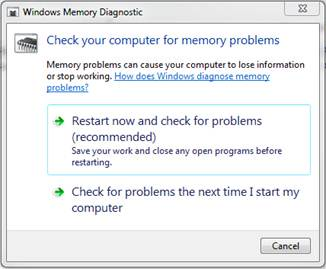
Typically, we run memory diagnostics from a bootable CD, but if you are trying to troubleshoot a computer in another city this is not always possible. Windows 7, Vista, Server 2008, and Server 2008 R2 have a built in utility called mdsched.exe. The utility can be started from a Windows session and will start automatically at the next reboot. The default is a simple memory diagnostic, but extended testing can be performed. Results will display during the test, on screen after the test, and in the Event Viewer under Applications and Services > Microsoft > Windows > MemoryDiagnostics-Results > Memory Diagnostic Tool after the test is complete.
More detailed information can be found here: [more]
http://www.sevenforums.com/tutorials/715-memory-diagnostics-tool.html
Over the years, many people have asked me about backup for home machines. Burning files to DVDs and carry them to a different location is problematic. It's a lot of trouble to make frequent offsite backups. I recently did some research and decided on using a program called Duplicati for backup and Amazon S3 (Simple Storage Service) for storage. I think having the backup program and the storage separate is the best solution. I can even back up to multiple providers in case one of them just goes away without warning.
Duplicati is free and open source and runs on Windows, Linux and MacOS. It has a nice GUI interface plus a rich command line. Duplicati has built-in AES-256 encryption, which means you hold the key and your backups are encrypted before leaving your network. It creates normal zip files and then encrypts them with AES Crypt, so even if Duplicati breaks, you can still download, decrypt, and unzip your backups using other standard tools. [more]
Duplicati will back up to many different cloud providers (Amazon S3, Rackspace, Google Docs, SkyDrive, Tahoe-LAFS, WEBDAV, FTP, SSH) as well as file based locations.
I chose Amazon S3 for storage because of the history of reliability of Amazon. The cost if not much either. You get 5 GB free, and then it’s 12.5¢/GB/month after that. So you can store 50GB for less than $6/month. It is even cheaper if you choose the Reduced Redundancy Storage (RRS).
Get Duplicati here http://www.duplicati.com/.
Sign up for Amazon S3 storage here http://aws.amazon.com/.
I’ve been working on migrating an Exchange environment to 2010. This process includes an upgrade to the Unified Messaging role of Exchange to 2010 as well. We had purchased a UCC certificate to include all the Subject Alternate Names our Exchange environment would need and I had already applied it to the CAS server successfully. Since this certificate also included the FQDN of our UM server, I added the cert. and assigned the UM service to it so that Exchange could start processing voicemails through 2010 instead of 2007. [more]
After I had moved a couple of mailboxes (including mine) over for testing, I discovered that I could no longer receive voicemail. People were redirected to the Subscriber Attendant instead of my individual mailbox. There were events logged on the UM server saying the following:
Event ID: 1400 Source: MSExchange Unified Messaging
The following UM IP gateways did not respond as expected to a SIP OPTIONS request. Transport = TLS, Address = lync.ourdomain.com, Port = 5061, Response Code = 0, Message = This operation has timed out.
After considerable troubleshooting, I ran across a forum posting (http://social.msdn.microsoft.com/Forums/en-US/communicationsserversdk/thread/2733adf2-c91b-4b94-bf43-be93cdd2d5ef/) from someone who encountered the same issue and called for a support incident with Microsoft to figure out what was going on. In order for UM to work in a Lync phone system environment, the Subject Name of the certificate installed must be the FQDN of the UM server itself. It won’t work if it’s just included as a Subject Alternate Name; it must be the Subject Name.
I generated a new certificate from our internal CA with the UM server as the SN of the certificate, installed and assigned it to the UM roles (leaving our UCC cert running the remaining roles), and immediately started receiving voicemail notifications.
I found one other blog posting after the fact that backed this claim up even more (http://therealshrimp.blogspot.com/2012/03/multiple-exchange-um-servers-and.html).